Lusha vs Clearbit: Sales Prospecting vs Marketing Enrichment
Lusha focuses on direct dials and emails for sales prospecting, while Clearbit specializes in marketing data enrichment. Here's how to choose the right tool.
Lusha is a sales prospecting tool built for finding direct dials and emails through a browser extension, priced from free (70 credits/month) to $59/user Premium plans, while Clearbit (now HubSpot's Breeze Intelligence) is a marketing enrichment platform requiring a HubSpot subscription, starting around $65/month combined, designed for automated lead scoring and website visitor identification.
Key takeaways
- Lusha's free tier offers 70 credits per month, while its Pro plan costs $36/user and includes 480 annual credits with CSV enrichment for up to 300 rows.
- Clearbit was acquired by HubSpot in 2023 and rebranded as Breeze Intelligence, now requiring a HubSpot subscription starting at $20+/month plus a $45/month add-on for 100 credits.
- Lusha's credit system costs 1 credit to reveal an email and 10 credits to reveal a phone number, working out to roughly $0.08 per email and $0.75 per phone reveal on the Pro plan.
- Clearbit maintains a database of 30M+ companies and 500M+ contacts, according to its own documentation.
- Clearbit enterprise contracts reached $20,000 to $100,000+ annually for high-volume usage before HubSpot retired the standalone product and folded it into Breeze Intelligence.
Reviewed and updated September 1, 2026
Lusha vs Clearbit: Sales Prospecting Tool vs Marketing Enrichment Platform
Choosing between Lusha and Clearbit comes down to understanding how each platform fits your workflow. Both provide B2B data enrichment, but they serve different primary use cases. Lusha excels at sales prospecting with direct contact discovery, while Clearbit (now Breeze Intelligence under HubSpot) focuses on marketing enrichment and lead scoring.
This guide provides an objective comparison to help you determine which platform matches your needs.
The Quick Answer

If you need quick access to phone numbers and emails for outbound sales prospecting, Lusha is the more straightforward choice. The browser extension works directly on LinkedIn and company websites, revealing contact information with a single click. Sales reps who spend their days prospecting will find the workflow familiar and efficient.
Since sales reps often weigh multiple prospecting tools before committing, it helps to review a comparison of contact discovery platforms built around LinkedIn and multi-platform outreach.
If you run inbound marketing through HubSpot and want automated enrichment, visitor identification, and lead scoring, Clearbit (Breeze Intelligence) provides deeper integration with marketing workflows. The platform shines when enriching form submissions and identifying anonymous website visitors.
Understanding the Core Difference
Both platforms provide B2B data. Both help you learn more about contacts and companies. The fundamental difference is where each tool fits in your revenue process.
Lusha is built for sales prospecting. The primary use case is finding contact information for specific people or companies you want to reach. You find a prospect on LinkedIn, click the extension, and get their email and phone number. The workflow is manual and intentional, designed for sales reps building prospect lists.
Sales reps who rely on cold email outreach alongside phone and LinkedIn prospecting may want to review the email warmup tool comparison before scaling outbound volume.
Clearbit is built for marketing enrichment. Following its acquisition by HubSpot in 2023, the platform has become Breeze Intelligence, deeply integrated into HubSpot's ecosystem. The primary use case is enriching inbound leads automatically, shortening forms, and identifying website visitors. The workflow is automated and passive, designed for marketing teams optimizing conversion.
Teams already inside HubSpot's ecosystem may wonder how enrichment and pipeline management now relate, a question explored in this comparison of Clearbit and HubSpot CRM.
Pricing Comparison
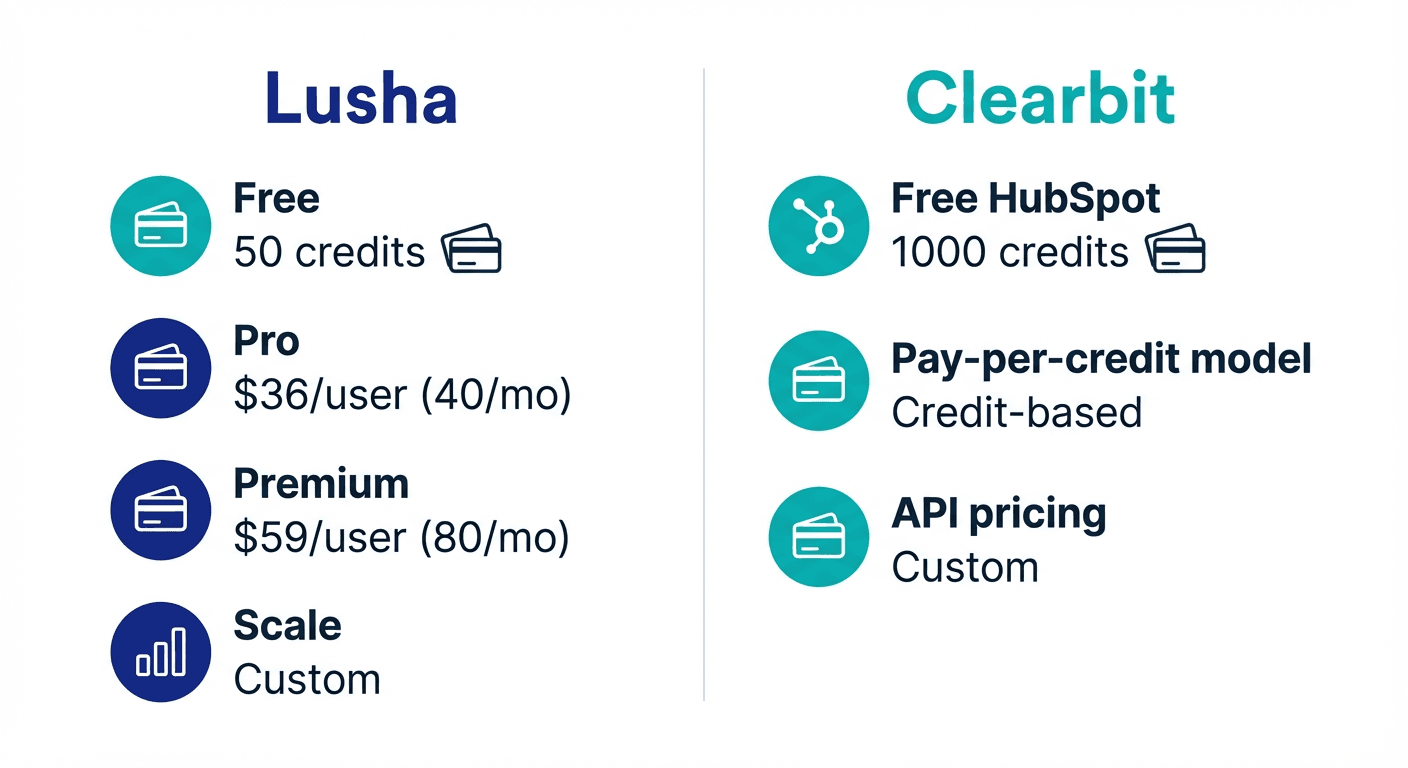
Lusha Pricing (as of January 2026)
| Plan | Monthly Price | Credits | Key Features |
|---|---|---|---|
| Free | $0 | 70/month | Browser extension, basic search |
| Pro | $36/user | 480/year (~40/month) | CSV enrichment (300 rows), bulk show (50 contacts) |
| Premium | $59/user | 960/year (~80/month) | CSV enrichment (500 rows), bulk show (150 contacts) |
| Scale | Custom | Custom | CSV enrichment (10,000 rows), team management, SSO |
Lusha operates on a credit system where revealing an email address costs 1 credit and revealing a phone number costs 10 credits. Paid plans include a shared credit pool across team members.
Source: lusha.com/pricing
Clearbit (Breeze Intelligence) Pricing (standalone ladder retired)
| Plan | Monthly Price | Credits | Requirements |
|---|---|---|---|
| Entry | $45 | 100/month | HubSpot Starter subscription ($20+/mo) |
| Business | ~$300+ | 1,000+/month | HubSpot Professional subscription |
| Enterprise | Custom | Custom | HubSpot Enterprise subscription |
Important: All Clearbit/Breeze Intelligence plans require a corresponding HubSpot subscription. The pricing shown is for the enrichment add-on only. Total cost includes both your HubSpot subscription and the Breeze Intelligence add-on.
Following the HubSpot acquisition, the credit system changed. As of 2025, 1 enrichment consumes 10 HubSpot Credits, and credits expire monthly with no rollover.
Source: clearbit.com/pricing, hubspot.com/products/clearbit
Pricing Analysis
Entry-level comparison: Lusha's free tier (70 credits/month) provides more initial value than Clearbit's minimum entry point, which requires both a HubSpot subscription and Breeze Intelligence add-on (minimum ~$65/month combined).
Cost per contact: Lusha's Pro plan at $36/user provides 480 annual credits. For email-only reveals (1 credit each), this works out to roughly $0.08 per contact. Phone reveals at 10 credits each cost approximately $0.75 per contact. Clearbit's last standalone entry tier, $45/month for 100 credits, worked out to $0.45 per enrichment before HubSpot retired it into Breeze Intelligence.
Platform dependency: Lusha works independently with any CRM. Clearbit requires HubSpot, which may or may not align with your existing tech stack.
Teams weighing another sales engagement suite against HubSpot's enrichment tools can see a similar breakdown in the Apollo.io and Clearbit cross-category analysis.
Scalability: Lusha offers custom enterprise pricing and its Scale plan is negotiable based on team size and credit needs. Clearbit enterprise contracts reached $20,000-$100,000+ annually for high-volume usage before HubSpot retired the standalone product; that spend now runs through a HubSpot subscription.
Data Coverage and Sources
Lusha Data
Lusha maintains a B2B contact database with particular strength in:
- Direct dial phone numbers: A recognized strength of the platform
- Email addresses: Verified business emails
- Company information: Firmographic data including size, industry, revenue
- Technology data: Tech stack information for target companies
- Job change alerts: Notifications when contacts change roles
Lusha uses a community-verified data model. Users who install the extension contribute to data accuracy through collective verification.
Clearbit Data
Clearbit maintains a proprietary database with:
- Global coverage: 30M+ companies, 500M+ contacts (per Clearbit documentation)
- Real-time refresh: Continuous data updates
- Corporate hierarchy: Parent/subsidiary relationships
- Technographic data: Technology stack detection
- Intent signals: Buying intent indicators
- Visitor intelligence: IP-to-company matching
Data Coverage Comparison
Phone numbers: Lusha has built a strong reputation for direct dial accuracy. Sales teams prioritizing phone outreach often cite this as a key differentiator.
Breadth vs. depth: Clearbit's publicly stated database size (30M+ companies, 500M+ contacts) is larger than what Lusha publicly discloses. However, database size alone does not determine data quality for your specific market.
Data freshness: Both platforms maintain verification processes. Clearbit's real-time refresh is designed for marketing automation use cases where immediate accuracy matters.
Testing recommendation: Evaluate both platforms against your specific target market. Data coverage varies by industry, geography, and company size.
Key Features
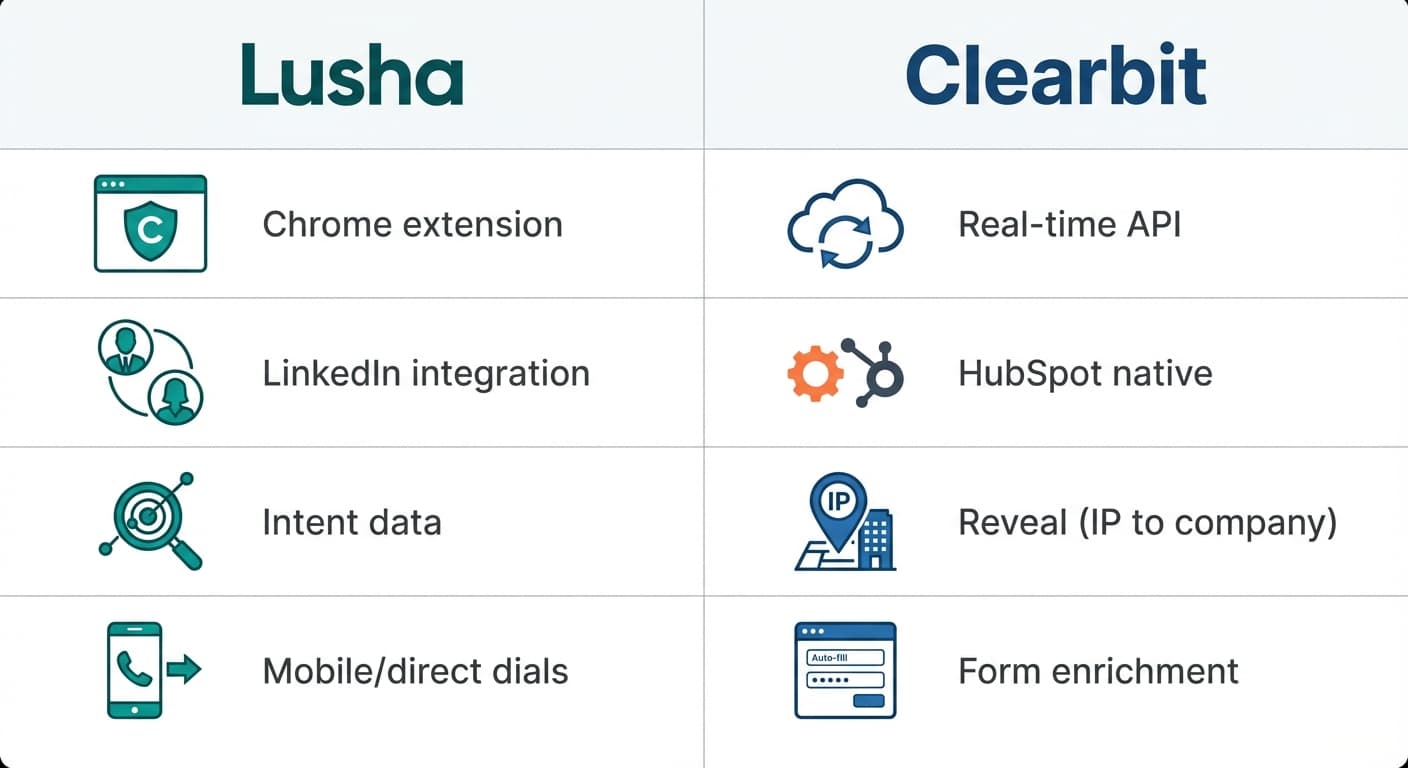
Lusha Features
Browser Extension: The core product feature. Works on LinkedIn profiles, LinkedIn Sales Navigator, and company websites. One-click contact reveal without leaving the page.
CSV Enrichment: Upload a list of companies or contacts and receive enriched data in return. Row limits vary by plan (300 for Pro, 500 for Premium, 10,000 for Scale).
Bulk Contact Reveal: Discover multiple contacts at once within the platform interface. Limits vary by plan (50 for Pro, 150 for Premium, 5,000 for Scale).
Intent Signals: Identify companies showing buying intent for relevant topics.
Technology Filters: Search for companies using specific technologies in their stack.
CRM Integrations: Direct sync with Salesforce, HubSpot, Microsoft Dynamics 365, Pipedrive, and Zoho CRM.
Team Management: Credit allocation and usage tracking across team members (Scale plan).
Clearbit Features
Real-Time Enrichment: Automatic enrichment at point of lead capture. Form submissions are enriched before entering HubSpot.
Dynamic Form Shortening: Reduce form fields by auto-filling known information. Ask only for email if Clearbit can supply the rest.
Visitor Identification (Reveal): Identify anonymous website visitors by company through IP address matching.
Lead Scoring: Score leads automatically based on enriched firmographic and technographic attributes.
Intent Signals: Track buying intent indicators across your target market.
Corporate Hierarchy: Understand parent company, subsidiary, and acquisition relationships.
Native HubSpot Integration: Data flows directly into HubSpot records with no manual import/export required.
Feature Comparison Analysis
Lusha is designed for active prospecting. You find prospects, reveal their contact information, and reach out. The workflow is sales-rep-driven.
Clearbit is designed for passive enrichment. Leads come in, get enriched automatically, and route to sales based on scoring. The workflow is system-driven.
These are complementary approaches. Some organizations use both, with Clearbit enriching inbound leads and Lusha supporting outbound prospecting.
Integration Ecosystem
Lusha Integrations
- CRMs: Salesforce, HubSpot, Microsoft Dynamics 365, Pipedrive, Zoho CRM
- Email: Gmail, Outlook
- Sales Engagement: Outreach, SalesLoft
- Automation: Zapier, Make, n8n
- API: REST API for custom integrations
Lusha's integration approach is CRM-agnostic. The platform works with multiple CRM systems natively and supports custom workflows through automation platforms.
Clearbit Integrations
- CRMs: HubSpot (native), Salesforce (limited since acquisition)
- Marketing Automation: Native HubSpot marketing tools
- Data Platforms: Segment (limited)
- Note: Following the HubSpot acquisition, Clearbit has prioritized HubSpot integration above all else. Independent API access now requires enterprise contracts.
Integration Analysis

If you use HubSpot, Clearbit provides the deepest integration. Data enrichment happens automatically within your existing HubSpot workflows.
If you use Salesforce, Pipedrive, Dynamics, or another CRM, Lusha offers more straightforward integration. Clearbit's Salesforce support has become more limited since the HubSpot acquisition.
If you need flexibility, Lusha's connections to Zapier, Make, and n8n allow custom workflow automation regardless of your primary CRM.
Use Case Recommendations
Best Fit for Lusha
- Outbound sales teams: Browser extension enables fast prospecting on LinkedIn
- Phone-first sales approaches: Strong direct dial accuracy
- Teams using non-HubSpot CRMs: Native integrations with Salesforce, Pipedrive, Dynamics, Zoho
- Individual sales reps: Simple workflow without requiring marketing automation
- Budget-conscious teams: Lower entry point and pay-per-use model
- Multi-CRM environments: Agencies or companies with varied client stacks
Best Fit for Clearbit
- HubSpot-centric organizations: Native integration eliminates friction
- Inbound marketing teams: Form shortening and automatic enrichment improve conversion
- Website visitor identification: Reveal anonymous visitors by company
- Lead scoring and routing: Automatic scoring based on enriched attributes
- Enterprise marketing operations: Corporate hierarchy and global data coverage
- Marketing and sales alignment: Unified data across HubSpot marketing and sales hubs
Workflow Examples
Lusha Workflow: Outbound Prospecting
- Sales rep identifies target accounts
- Rep searches LinkedIn for decision-makers at target companies
- Lusha extension reveals email and phone number on profile
- Rep exports contact to CRM with one click
- Rep adds contact to outreach sequence
- Rep follows up via phone using direct dial
This workflow is manual and intentional. The sales rep controls each step.
Clearbit Workflow: Inbound Enrichment
- Marketing runs campaigns driving traffic to website
- Clearbit identifies anonymous visitors by company via IP
- Visitor fills short form (email only)
- Clearbit enriches with name, title, company, size, industry
- HubSpot lead score calculates automatically
- High-scoring leads route to sales immediately
- Sales follows up with enriched context
This workflow is automated. The system handles enrichment and routing.
Combined Workflow
Some organizations use both platforms:
- Clearbit enriches inbound leads and identifies website visitors
- Marketing qualifies and scores leads automatically
- Sales receives enriched inbound leads in their CRM
- Sales uses Lusha to find additional contacts at high-value accounts
- Lusha reveals direct dials for decision-makers not captured through inbound
- Sales pursues both inbound and outbound opportunities
Feature Comparison Summary
| Feature | Lusha | Clearbit |
|---|---|---|
| Primary Use Case | Sales prospecting | Marketing enrichment |
| Browser Extension | Yes (core feature) | No |
| Form Shortening | No | Yes |
| Visitor Identification | No | Yes |
| Lead Scoring | No | Yes (native HubSpot) |
| Direct Dial Phone | Yes (strength) | Limited |
| CSV Enrichment | Yes | Via HubSpot |
| Real-Time Enrichment | No | Yes |
| CRM Independence | Yes (6+ CRMs) | Requires HubSpot |
| Automation Integrations | Zapier, Make, n8n | Limited |
| Free Tier | 70 credits/month | No free tier |
| Entry Price | $36/user/month | ~$65/month (HubSpot + add-on) |
| Credit Rollover | Plan-dependent | No rollover |
Getting Started Checklist
If You Choose Lusha
Week 1: Setup
- Create account and test with free credits
- Install browser extension on Chrome
- Connect your CRM integration
- Reveal 20-30 test contacts in your target market
- Evaluate data accuracy (emails, phone numbers)
Week 2: Workflow Integration
- Upgrade to paid plan if data quality meets needs
- Set up export workflow to CRM
- Train team members on extension usage
- Establish credit allocation guidelines
- Create saved searches for target personas
Week 3+: Scale
- Monitor credit usage patterns
- Track contact accuracy over time
- Evaluate phone connection rates on direct dials
- Adjust plan tier based on actual consumption
If You Choose Clearbit
Week 1: Setup
- Confirm HubSpot subscription tier (required)
- Add Breeze Intelligence to your HubSpot account
- Configure enrichment settings
- Install tracking code for visitor identification
- Test form shortening on a landing page
Week 2: Workflow Integration
- Set up lead scoring rules based on enriched attributes
- Configure lead routing for high-scoring leads
- Create reports on visitor identification data
- Review enrichment match rates
Week 3+: Optimize
- Refine scoring criteria based on conversion data
- Expand form shortening across additional pages
- Analyze visitor identification for ABM targeting
- Monitor credit consumption and plan appropriately
Considerations Before Choosing
Platform Lock-In
Clearbit's deep HubSpot integration is both a strength and a constraint. If you ever need to migrate away from HubSpot, your enrichment infrastructure moves with you only partially. Clearbit as a standalone product is no longer available, which limits flexibility.
Lusha operates independently, connecting to multiple CRMs. Switching CRMs does not require changing your prospecting tool.
Team Structure
If your organization separates marketing and sales tools, Clearbit serves marketing while Lusha serves sales. Both can coexist.
If you want a single tool serving both teams, consider whether your workflow is primarily inbound (favoring Clearbit) or outbound (favoring Lusha).
Budget Allocation
Marketing typically controls Clearbit budgets since the tool serves inbound enrichment. Sales typically controls Lusha budgets since the tool serves outbound prospecting.
Consider which team owns the budget and whether the tool's use case aligns with that team's priorities.
Final Thoughts
Lusha and Clearbit serve different purposes despite both providing B2B data.
Choose Lusha for: Direct sales prospecting, phone number discovery, LinkedIn-based workflow, CRM flexibility, outbound sales teams, lower entry cost
Choose Clearbit for: Marketing enrichment, HubSpot native integration, visitor identification, form optimization, lead scoring, inbound marketing workflows
The right choice depends on your primary use case. Outbound sales teams building prospect lists will find Lusha's workflow more natural. Marketing teams optimizing inbound conversion will find Clearbit's automation more valuable.
For organizations running both inbound and outbound motions, using both tools is a legitimate option. Clearbit handles automatic enrichment of marketing leads while Lusha supports manual prospecting by sales reps.
Evaluate both platforms against your specific requirements. Test data quality in your target market. Consider your existing tech stack. Then choose the tool that fits your workflow rather than trying to adapt your workflow to a tool.
Related Reading
- ZoomInfo vs Clearbit: Enterprise Sales Intelligence vs Marketing Data Enrichment
- Clearbit vs Lusha: Data Enrichment Tool Comparison
- Apollo vs Clearbit: Comparing B2B Data Platforms for Sales and Marketing
If you would rather have this run for you, RevenueFlow books qualified meetings on a pay-per-meeting basis and publishes client results.
Pricing and features verified as of January 2026. Visit official websites for current information.
Frequently asked questions.
Frequently asked questions- What is the main difference between Lusha and Clearbit?
- Lusha is built for sales prospecting, letting reps manually find contact emails and phone numbers via a browser extension on LinkedIn or company sites. Clearbit, now called Breeze Intelligence under HubSpot, is built for marketing enrichment, automatically enriching inbound leads, shortening forms, and identifying anonymous website visitors within HubSpot's ecosystem.
- Do I need HubSpot to use Clearbit?
- Yes, all Clearbit (Breeze Intelligence) plans require a corresponding HubSpot subscription, starting at $20+/month for HubSpot Starter. The listed pricing for Breeze Intelligence is only for the enrichment add-on itself, so total cost includes both the HubSpot subscription and the add-on fee.
- How much does Lusha cost compared to Clearbit?
- Lusha's free tier provides 70 credits per month at no cost, and its Pro plan is $36/user for roughly 40 credits monthly. Clearbit's minimum entry point requires both a HubSpot subscription and the Breeze Intelligence add-on, combining to roughly $65/month at minimum, making Lusha's entry-level offering cheaper and more accessible.
- Which tool is better for sales teams doing outbound prospecting?
- Lusha is the better fit for outbound sales prospecting because its browser extension works directly on LinkedIn and company websites, revealing contact emails and phone numbers with a single click. This manual, intentional workflow suits sales reps building prospect lists, whereas Clearbit's automated approach is designed more for inbound marketing enrichment.
- Can Lusha work with any CRM, or is it tied to a specific platform?
- Lusha works independently and can be used with any CRM, unlike Clearbit which requires a HubSpot subscription. This platform independence gives Lusha more flexibility for teams whose tech stack doesn't already center on HubSpot.
About the author.

Tim Carden is CMO / CTO at RevenueFlow, which builds and operates outbound revenue engines for B2B companies. Studied at McGill University.
Tim Carden · CMO / CTO
Connect on LinkedIn →Explore more.
Ready to scale your outreach?
We build GTM engines that book real meetings. See the receipts.
Related articles.
Cognism vs Upcell: A Data Provider Against a Data Layer
Cognism sells compliance-first contact data by quote and credit; Upcell sells a layer that runs your providers, Cognism included, through one record. Read 18 Sep 2026.
Metadata vs 6sense: Paid Media Execution vs Intent
Metadata runs paid B2B campaigns through seven AI agents; 6sense ranks accounts on intent and sells contact data by credit. Neither publishes a rate. Read 18 Sep 2026.
PromptLoop vs ZoomInfo: Web Research Against a Database
PromptLoop builds a dataset from the live web in credits it publishes; ZoomInfo sells access to a maintained database by quote. Both pages read 18 September 2026.
Chili Piper vs LeanData: Form-First Against CRM-First
Chili Piper publishes a seat floor and bundles scheduling and chat; LeanData prices by Salesforce object and sells scheduling separately. Both read 18 September 2026.
Zoom Revenue Accelerator vs Gong: An Add-On vs a Platform
Zoom's support centre documents Revenue Accelerator as a licence on a Zoom account in two classes; Gong sells a platform per user plus a platform fee. Neither has a rate.
Mailshake vs Pipedrive: A Sender and a CRM, Side by Side
Mailshake sells per-user sending with a two-way Pipedrive sync from its middle tier; Pipedrive is a per-seat CRM with sequences from Growth. Both read 18 September 2026.