ZoomInfo vs Clay: Data Platform vs Orchestration Tool
ZoomInfo is a comprehensive B2B database with 600M+ profiles, while Clay aggregates data from 75+ providers. Here's when to use each approach.
ZoomInfo is a proprietary B2B database platform with 600M+ profiles and 400+ human researchers, priced from $14,995/year with mandatory annual contracts. Clay is a data orchestration tool that aggregates 75+ providers (including ZoomInfo) via waterfall workflows, using usage-based credit pricing with no fixed annual commitment. ZoomInfo suits enterprises needing verified, consistent data; Clay suits teams wanting flexible, multi-source coverage.
Key takeaways
- ZoomInfo maintains over 600 million professional profiles and 135 million verified phone numbers validated by a team of 400+ human researchers.
- Clay aggregates data from 75+ providers, including ZoomInfo, Apollo, Clearbit, Lusha, and Cognism, through waterfall enrichment workflows.
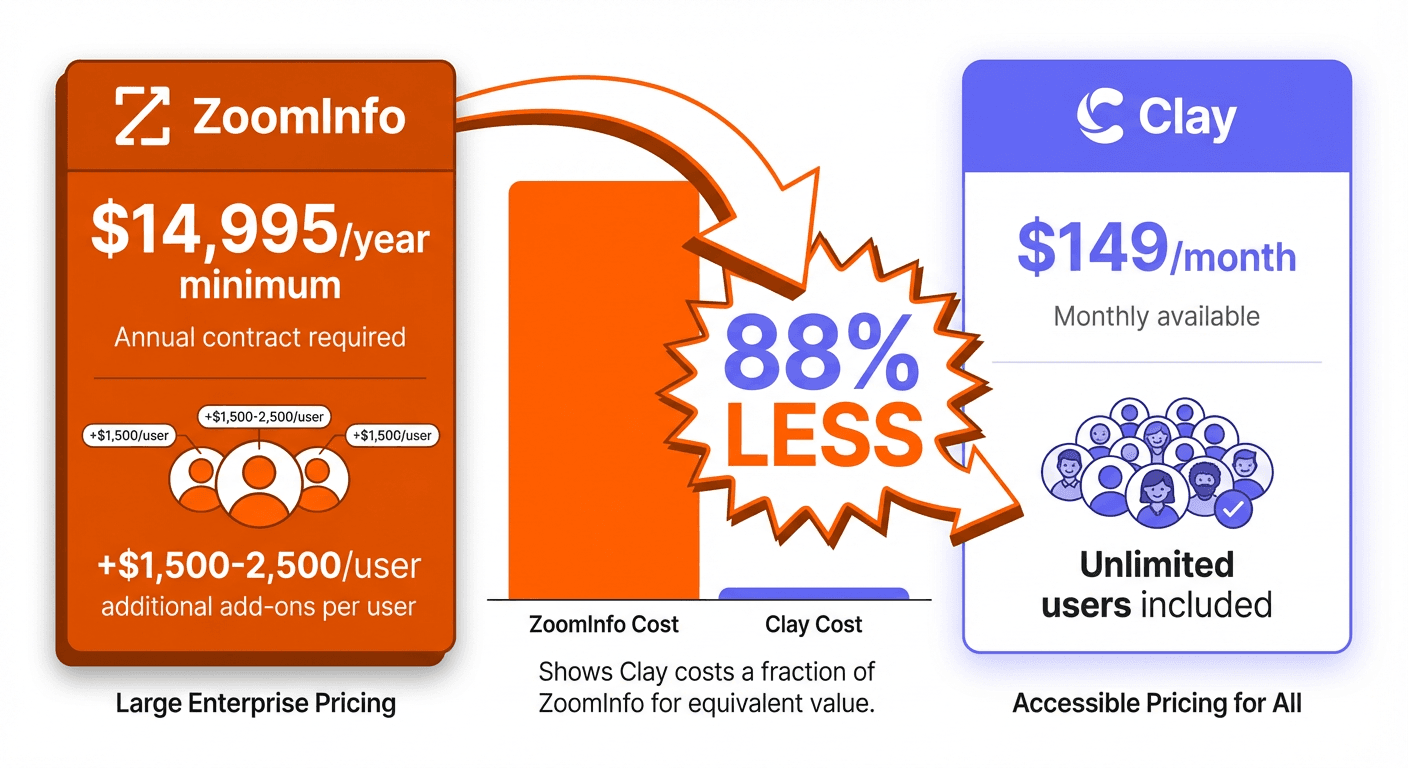
- ZoomInfo's Professional plan starts around $14,995/year with mandatory annual contracts and per-user fees ranging from $1,500-$2,500.
- Clay uses usage-based, credit-based pricing with unlimited users on all paid plans, starting from 15,000 actions/month on the Launch tier.
- Clay credit costs vary by provider, ranging from 1 credit to 5 credits per enrichment depending on the data source used.
Reviewed and updated September 15, 2026
ZoomInfo vs Clay: Enterprise Data Platform vs Data Orchestration Tool
ZoomInfo and Clay represent two fundamentally different philosophies in B2B data intelligence. ZoomInfo maintains one of the largest proprietary contact databases in the industry. Clay orchestrates data from dozens of providers through a single interface. Understanding these architectural differences helps you choose the right approach for your sales and marketing needs.
This guide provides an objective comparison based on publicly available information to help you make an informed decision.
The Quick Answer
If you're an enterprise organization requiring a massive proprietary database, intent data across thousands of topics, verified phone numbers, and comprehensive technographic insights, ZoomInfo delivers a complete solution. The tradeoff is significant annual investment starting around $14,995/year with mandatory annual contracts.
If you need maximum data coverage by aggregating multiple sources, flexible credit-based pricing, sophisticated workflow automation, and AI-powered research capabilities, Clay offers superior flexibility with usage-based pricing rather than a fixed annual contract.
Understanding the Core Difference
The architectural difference between these platforms shapes every aspect of the comparison.
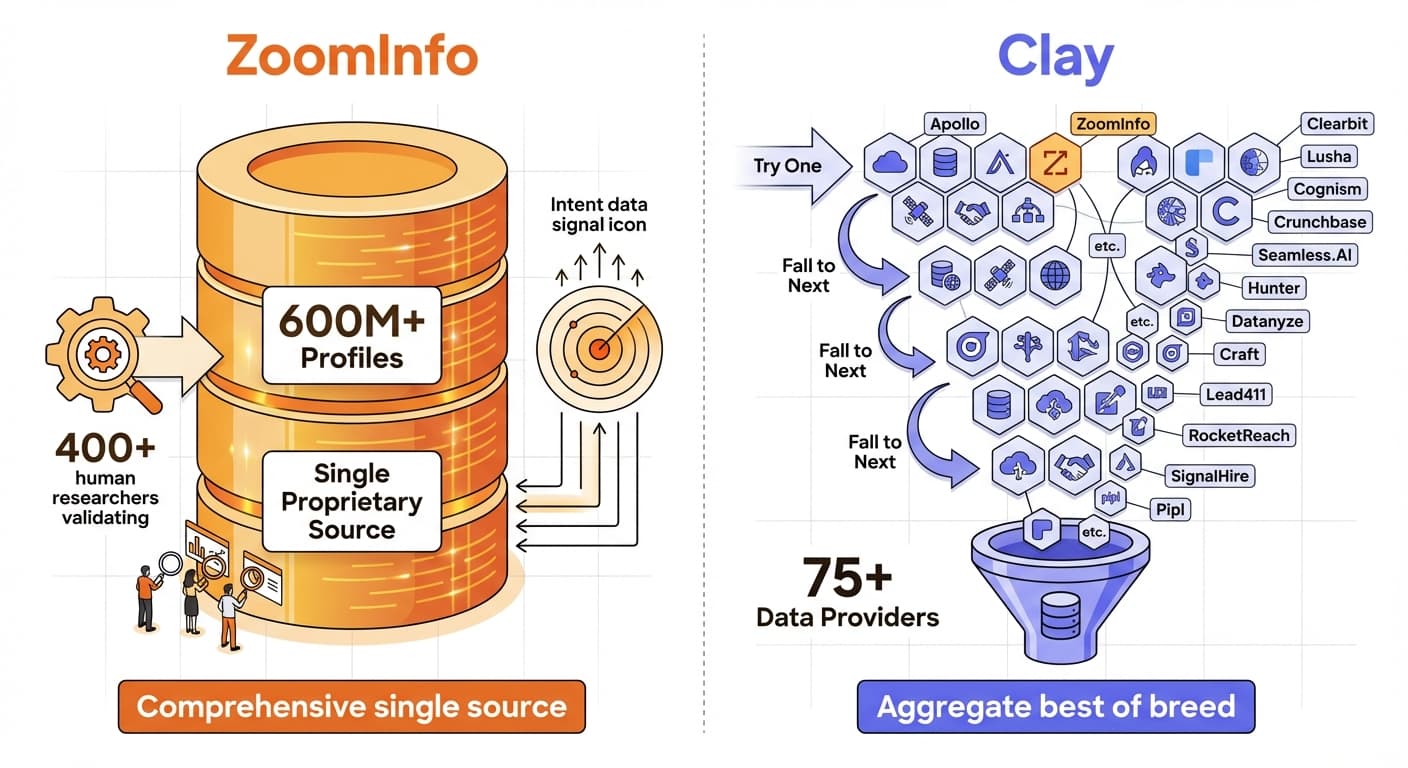
ZoomInfo operates as a comprehensive B2B intelligence platform with a proprietary database. The company maintains over 600 million professional profiles and 135 million verified phone numbers. A dedicated research team of 400+ human researchers validates data points. ZoomInfo owns, maintains, and continuously updates the data you access.
Datanyze vs LeadIQ examines two lighter weight enrichment tools, contrasting technographic prospecting with champion tracking and email personalization features.
Clay operates as a data orchestration platform. Rather than maintaining its own database, Clay connects to 75+ data providers including ZoomInfo, Apollo, Clearbit, Lusha, and dozens more. Users build workflows that query multiple sources in "waterfall" sequences. When one provider returns no data, Clay automatically tries the next. Clay aggregates and orchestrates other providers' data.
This distinction matters because:
- ZoomInfo offers consistent data quality from a single, verified source with enterprise-grade support
- Clay provides flexibility to combine multiple sources, often achieving higher match rates at lower per-record costs
Pricing Comparison
ZoomInfo Pricing (as of January 2026)
| Plan | Annual Price | Credits | Key Features |
|---|---|---|---|
| Lite (Free) | $0 | 10-25/month | Very limited database access |
| Professional | ~$14,995/year | 5,000 annual bulk credits | Core database, basic intent |
| Advanced | ~$24,995/year | 10,000 annual bulk credits | Full intent signals, technographics |
| Elite | ~$39,995/year | 10,000+ bulk credits | All features, ZoomInfo Copilot |
ZoomInfo uses custom pricing based on team size, feature requirements, and usage patterns. All paid plans require annual contracts. Per-user fees typically range from $1,500-$2,500 depending on tier. Many contracts include automatic renewal with 10-20% price increases.
Source: zoominfo.com/pricing
Clay Pricing (as of January 2026)
| Plan | Monthly Price | Annual Price | Monthly Credits |
|---|---|---|---|
| Launch | $185/mo | $167/mo | From 15,000 actions/month |
| Growth | $495/mo | $446/mo | From 40,000 actions/month |
| Enterprise | Contact Sales | Contact Sales | Custom |
Clay publishes a floor for each plan, $185/mo on Launch and $495/mo on Growth, and meters actions above it, with unlimited users on all paid plans. Credits roll over on paid plans, and higher tiers offer better per-credit rates.
Source: clay.com/pricing
Pricing Analysis
Entry-level comparison:
- ZoomInfo Professional: ~$14,995/year ($1,249/month equivalent)
- Clay Launch: $185/mo (from 15,000 actions/month)
Clay's entry point is a published $185/mo floor that then scales with the actions you run rather than a fixed annual commitment, so the comparison depends on how much you put through it.
Mid-market comparison:
- ZoomInfo Advanced: ~$24,995/year
- Clay Growth: $495/mo (from 40,000 actions/month)
Clay does not publish a list price at this volume, so the comparison depends on the action volume you commit to.
Enterprise considerations:
- ZoomInfo Elite: ~$39,995+/year (often higher with additional users and features)
- Clay Enterprise: Custom pricing (typically lower than equivalent ZoomInfo contracts)
Credit consumption note: Clay credits vary by data source. A single enrichment might cost 1 credit from one provider or 5 credits from another. Waterfall workflows that try multiple sources can consume credits quickly. ZoomInfo's credit system is more straightforward with fixed allocation per plan.
Database and Data Coverage
ZoomInfo Database
ZoomInfo maintains one of the largest proprietary B2B databases:
- 600M+ professional profiles globally
- 135M+ verified phone numbers
- 65M+ direct dial numbers
- 100M+ company records
- Intent data covering 11,000+ topics
- Technographic data on technology stacks
- Org chart mapping
- 400+ human researchers validating data
ZoomInfo's data verification team continuously updates records, reducing data decay compared to automated-only solutions.
Source: zoominfo.com
Clay Data Sources
Clay aggregates 75+ data providers through a single interface:
Contact Data Providers: Apollo, ZoomInfo (yes, including ZoomInfo), Clearbit, Lusha, People Data Labs, Cognism, LeadIQ, RocketReach, Hunter.io, ContactOut
Company Data Providers: Crunchbase, BuiltWith, Owler, PitchBook, LinkedIn, Clearbit
Email Verification: ZeroBounce, NeverBounce, Bouncer, Kickbox, MillionVerifier
Technographics: BuiltWith, Wappalyzer, HG Insights
Social Profiles: LinkedIn, Twitter/X
The "waterfall enrichment" feature creates fallback chains. For example: try Apollo first, then ZoomInfo, then Lusha. This approach maximizes match rates by covering gaps across databases.
Source: clay.com
Data Coverage Comparison
ZoomInfo strengths:
- Consistent data quality from a single verified source
- Extensive phone number coverage (135M+ verified)
- Human-validated data points
- Comprehensive intent signals
- Detailed org charts and reporting structures
Clay strengths:
- Higher potential match rates through multi-source aggregation
- Flexibility to choose best-in-class providers for specific data types
- Cross-reference validation across multiple sources
- Access to specialized regional or industry-specific databases
Teams still weighing other data enrichment options might also examine Cognism versus ContactOut, which contrasts a compliance-focused sales intelligence platform against a LinkedIn-centric enrichment browser extension.
G2 comparison ratings:
- Lead Enrichment: Clay scores 9.4 vs ZoomInfo at 8.6
- Lead Builder: Clay scores 9.6 vs ZoomInfo at 8.8
- Quality of Support: Clay scores 9.6 vs ZoomInfo at 8.6
Source: G2 Comparison
Key Features
ZoomInfo Features
Comprehensive Contact Database: Direct access to 600M+ profiles without additional provider costs.
Intent Data: Signals covering 11,000+ topics indicating when companies research relevant solutions. Intent data helps identify accounts actively in buying cycles.
Technographics: Detailed technology stack data showing which tools and platforms companies use. Essential for targeting based on current tech infrastructure.
Org Charts: Hierarchical mapping of company structures, helping identify reporting relationships and decision-making chains.
Verified Phone Numbers: 135M+ verified numbers including 65M+ direct dials. Valuable for phone-heavy outreach strategies.
ZoomInfo Copilot: AI assistant providing recommendations and automating research tasks (Elite tier).
Native CRM Integrations: Deep bidirectional sync with Salesforce, HubSpot, and Microsoft Dynamics 365.
GTM Studio: Workflow automation for sales and marketing processes.
Clay Features
75+ Data Provider Integrations: Access ZoomInfo, Apollo, Clearbit, and dozens more through a unified interface.
Waterfall Enrichment: Chain multiple providers with automatic fallback logic. When one source returns no data, Clay automatically queries the next. Users report improving coverage from 30% to 80% using this approach.
Claygent (AI Research Agent): AI that performs custom research tasks. Claygent can visit websites, extract custom information, summarize LinkedIn activity, find company news, and generate hyper-personalized outreach content.
No-Code Workflow Builder: Visual spreadsheet-like interface for building multi-step enrichment and automation workflows. No technical expertise required.
Unlimited Users: All paid plans include unlimited team members, making per-user costs predictable.
Cold Email Tool Integrations: Direct export to Instantly, Smartlead, Lemlist, and other modern cold email platforms.
Credit Rollover: Unused credits carry forward on paid plans, reducing waste.
API and Webhooks: Trigger workflows from external systems and connect to any tool.
Integration Ecosystem
ZoomInfo Integrations
- CRMs: Salesforce (deep native integration), HubSpot, Microsoft Dynamics 365
- Sales Engagement: Outreach, SalesLoft
- Marketing Automation: Marketo
- Communication: Slack
- API: REST API for custom integrations
ZoomInfo emphasizes enterprise CRM integrations with bidirectional sync, automatic enrichment, and workflow triggers based on CRM activity.
Clay Integrations
- CRMs: Salesforce, HubSpot, Pipedrive, Close
- Cold Email Tools: Instantly, Smartlead, Lemlist
- Data Providers: 75+ sources accessible within the platform
- Productivity: Google Sheets, Airtable, Notion
- AI: OpenAI integration for custom prompts and content generation
- Automation: Zapier, Make
- API and Webhooks: HTTP connections to any tool
Clay provides broader integration options, particularly for teams using modern cold email tools or no-code productivity platforms.
Integration Comparison
ZoomInfo excels at: Deep enterprise CRM integrations, particularly with Salesforce and Dynamics 365. Automatic enrichment of CRM records and trigger-based workflows.
Clay excels at: Modern sales tech stack integrations (Instantly, Smartlead, Lemlist), no-code tool connections (Airtable, Notion), and flexible webhook-based automation.
Use Case Recommendations
Best Fit for ZoomInfo
- Enterprise sales organizations: Comprehensive data, intent signals, and enterprise-grade support
- Phone-heavy outreach: Extensive verified phone coverage (135M+) including direct dials
- Intent-driven selling: 11,000+ intent topics for identifying in-market accounts
- Technology-focused targeting: Detailed technographic data for selling to specific stacks
- Established sales tech stacks: Deep integrations with Salesforce, HubSpot, Dynamics 365
- Organizations requiring vendor consolidation: Single platform for data, intent, and engagement
- Teams needing org chart intelligence: Hierarchical mapping of decision-making structures
Best Fit for Clay
- Teams prioritizing data coverage: Waterfall enrichment maximizes match rates across providers
- Budget-conscious organizations: 88% lower entry cost than ZoomInfo
- Larger teams: Unlimited users on paid plans makes per-person cost predictable
- Complex enrichment workflows: Multi-step automation combining various data types
- AI-powered research needs: Claygent automates manual research tasks
- Outbound-focused teams: Native integrations with Instantly, Smartlead, Lemlist
- Agencies and consultants: Flexibility across different client tech stacks
- Teams wanting data validation: Cross-reference multiple sources for accuracy
Ease of Use Comparison
ZoomInfo Usability
G2 users rate ZoomInfo's ease of use at 8.8/10. The platform offers:
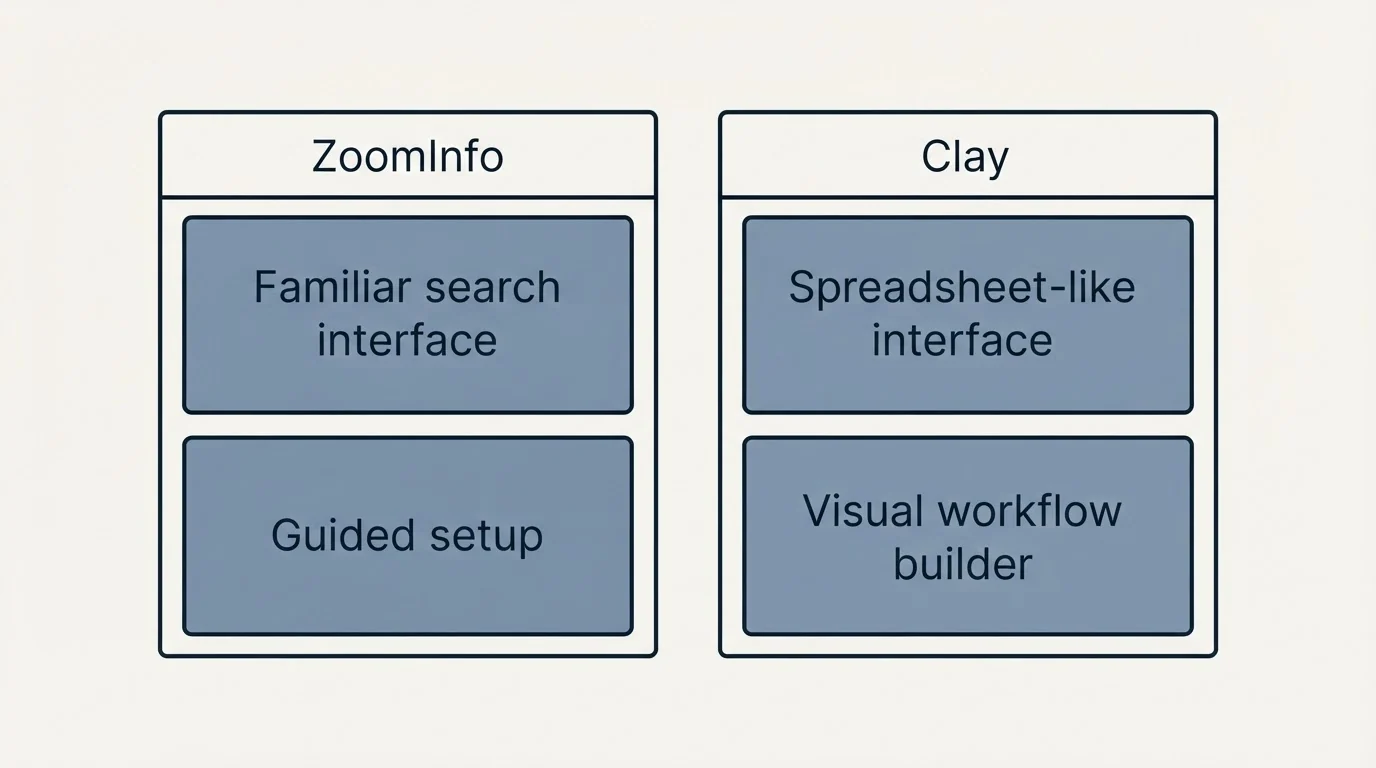
- Familiar search interface for filtering contacts and companies
- Guided setup for CRM integrations
- Built-in training and onboarding resources
- Dedicated customer success managers (Enterprise tiers)
- Consistent experience across all data types
The learning curve is manageable for most sales professionals familiar with database tools.
Clay Usability
G2 users rate Clay's ease of use at 8.0/10. The platform offers:
- Spreadsheet-like interface that feels familiar
- Visual workflow builder with drag-and-drop functionality
- Template library for common enrichment patterns
- Active community and documentation
However, users note a significant learning curve. As one reviewer stated: the platform is powerful but requires dedicated time to master, particularly for complex waterfall configurations and AI research agent setup.
Usability Comparison
ZoomInfo provides a more straightforward experience for teams wanting to search a database and export contacts. Clay offers more power but requires more initial investment to learn the workflow builder and optimize credit consumption.
Feature Comparison Summary
| Feature | ZoomInfo | Clay |
|---|---|---|
| Database Size | 600M+ profiles (proprietary) | 75+ providers (aggregated) |
| Phone Coverage | 135M+ verified | Via data sources |
| Entry Price | ~$14,995/year | $185/month per workspace |
| Contract Requirements | Annual required | Monthly available |
| Intent Data | 11,000+ topics (native) | Via integrations |
| Technographics | Comprehensive (native) | Via BuiltWith, Wappalyzer |
| AI Research Agent | ZoomInfo Copilot (Elite) | Claygent (Explorer+) |
| Waterfall Enrichment | No | Yes |
| Unlimited Users | No (per-seat) | Yes (all paid plans) |
| Cold Email Integrations | Limited | Instantly, Smartlead, Lemlist |
| CRM Integrations | Salesforce, HubSpot, Dynamics | Salesforce, HubSpot, Pipedrive, Close |
| Ease of Use (G2) | 8.8/10 | 8.0/10 |
Common Workflows

ZoomInfo Workflow Example
- Define ideal customer profile using advanced filters (industry, company size, technology stack, job title)
- Review intent signals to identify in-market accounts
- Use org charts to map decision-making structure
- Export contacts with verified phone numbers and emails
- Sync directly to CRM with automatic enrichment
- Set up alerts for job changes and company news
- Use GTM Studio to trigger outreach sequences
Clay Workflow Example
- Import company list from Google Sheets (domains or company names)
- Enrich company data from Clearbit
- Find decision-maker contacts using Apollo
- If Apollo returns no contacts, waterfall to ZoomInfo, then Lusha, then Cognism
- Verify emails through ZeroBounce
- Use Claygent to research recent funding, news, or LinkedIn activity for personalization
- Format personalization fields using OpenAI integration
- Export enriched list directly to Instantly or Smartlead for outreach
Getting Started Recommendations
If Choosing ZoomInfo
Pre-purchase: Evaluation
- Request demo and trial access
- Test data coverage in your target market and industries
- Evaluate intent signal relevance for your solution
- Understand total cost including user seats and feature add-ons
- Review contract terms including renewal pricing
Post-purchase: Implementation
- Work with implementation team on CRM integration
- Configure intent alerts for target topics
- Train team on search filters and data export
- Set up org chart workflows
- Establish usage monitoring to stay within credit limits
If Choosing Clay
Week 1: Foundation
- Create account and connect primary data sources
- Import a test batch of 50-100 companies
- Build your first enrichment workflow
- Track credit consumption to understand costs
Week 2-3: Optimization
- Configure waterfall sequences with 3-4 data sources
- Experiment with Claygent for research automation
- Set up export integrations to your email tool
- Create reusable templates for repeatable workflows
- Monitor match rates and adjust provider ordering
Data Quality Considerations
Both platforms face the universal challenge of B2B data decay. Professionals change jobs frequently, companies get acquired, and contact information becomes outdated.
ZoomInfo's approach: Dedicated team of 400+ human researchers validating data. Regular refresh cycles. User-reported data corrections. Enterprise-grade data governance.
Clay's approach: Access to multiple sources allows cross-referencing and validation. Waterfall enrichment can improve coverage. Email verification integrations (ZeroBounce, NeverBounce) add another validation layer.
Practical recommendation: Regardless of platform, implement email verification before sending campaigns. Build bounce monitoring into your workflow. Both approaches benefit from verification steps to protect deliverability.
Once deliverability protection is in place, comparing dedicated warmup tools like email warmup tool comparison can help keep sender reputation healthy alongside verification.
Cost-Effectiveness Analysis
Scenario: 10-person sales team, 50,000 contacts/year
ZoomInfo:
- Professional Plan: ~$14,995/year base
- 10 additional users at ~$1,500 each: ~$15,000
- Total: ~$29,995/year
Clay:
- Growth Plan: $495/mo (from 40,000 actions/month)
- Unlimited users included
- Total: quoted on usage, not published as a list price
Clay's cost for this scenario depends on the actions consumed. However, ZoomInfo provides intent data, verified phones, and org charts natively. Clay would require additional credits for multiple data source queries to match similar coverage.
The key tradeoff: ZoomInfo offers more comprehensive native data at premium pricing. Clay offers flexible multi-source access at lower cost with higher complexity.
Final Thoughts
ZoomInfo and Clay serve different needs despite solving similar problems.
Choose ZoomInfo for: Enterprise-grade data intelligence with a massive proprietary database, verified phone coverage, native intent data, and deep CRM integrations. Best for organizations with budget for premium tools who value vendor consolidation and enterprise support.
Choose Clay for: Flexible data orchestration, multi-source aggregation, AI-powered research, and modern cold email tool integrations. Best for teams wanting maximum coverage at lower cost who are willing to invest time learning the platform.
Some teams find value in using both. Clay can query ZoomInfo as one of its 75+ data sources, combining ZoomInfo's database quality with Clay's workflow automation. This hybrid approach increases coverage while maintaining access to ZoomInfo's verified data.
Since combining multiple providers is a common strategy, teams weighing smaller enrichment tools may also want to see how Clearbit stacks up against RocketReach.
For most organizations, start with your primary constraint:
- If budget is limited, start with Clay
- If data quality and phone coverage are paramount, start with ZoomInfo
- If workflow automation is essential, start with Clay
- If enterprise compliance and support matter most, start with ZoomInfo
Both platforms evolve rapidly. Evaluate current pricing and features before making a decision.
Related Reading
- ZoomInfo vs Clearbit: Enterprise Sales Intelligence vs Marketing Data Enrichment
- Apollo vs Clay: Choosing the Right Data Enrichment Tool for B2B Sales
- Clay vs Clearbit: Which B2B Data Enrichment Tool Fits Your Stack?
If you would rather have this run for you, RevenueFlow books qualified meetings on a pay-per-meeting basis and publishes client results.
Pricing and features verified as of January 2026. Visit official websites for current information.
Sources:
Frequently asked questions.
Frequently asked questions- What's the main difference between ZoomInfo and Clay?
- ZoomInfo maintains its own proprietary database of 600M+ profiles verified by 400+ human researchers, while Clay doesn't own data but orchestrates 75+ third-party providers (including ZoomInfo) through waterfall workflows that automatically try multiple sources when one fails to return data.
- Is Clay cheaper than ZoomInfo?
- It depends on usage volume. ZoomInfo requires fixed annual contracts starting at ~$14,995/year, while Clay uses usage-based credit pricing starting from 15,000 actions/month with unlimited users. Clay's Enterprise tier is typically lower cost than equivalent ZoomInfo contracts, but heavy waterfall usage can consume credits quickly.
- Can Clay access ZoomInfo's data?
- Yes, ZoomInfo is listed as one of Clay's 75+ contact data providers, alongside Apollo, Clearbit, Lusha, People Data Labs, Cognism, and others. Clay can pull ZoomInfo data as part of its waterfall enrichment sequences rather than requiring a separate ZoomInfo subscription.
- Which tool is better for enterprise sales teams?
- ZoomInfo fits enterprise organizations needing a massive proprietary database, intent data across 11,000+ topics, verified phone numbers, and technographic insights, backed by enterprise-grade support. The tradeoff is a significant annual investment starting around $14,995/year with mandatory contracts.
- Does ZoomInfo or Clay require an annual contract?
- ZoomInfo requires mandatory annual contracts on all paid plans, often with automatic renewal and 10-20% price increases. Clay does not require a fixed annual commitment; it offers usage-based pricing on Launch and Growth plans, with Enterprise available via custom contact-sales pricing.
About the author.

Tim Carden is CMO / CTO at RevenueFlow, which builds and operates outbound revenue engines for B2B companies. Studied at McGill University.
Tim Carden · CMO / CTO
Connect on LinkedIn →Explore more.
Ready to scale your outreach?
We build GTM engines that book real meetings. See the receipts.
Related articles.
Cognism vs Upcell: A Data Provider Against a Data Layer
Cognism sells compliance-first contact data by quote and credit; Upcell sells a layer that runs your providers, Cognism included, through one record. Read 18 Sep 2026.
PromptLoop vs ZoomInfo: Web Research Against a Database
PromptLoop builds a dataset from the live web in credits it publishes; ZoomInfo sells access to a maintained database by quote. Both pages read 18 September 2026.
Metadata vs 6sense: Paid Media Execution vs Intent
Metadata runs paid B2B campaigns through seven AI agents; 6sense ranks accounts on intent and sells contact data by credit. Neither publishes a rate. Read 18 Sep 2026.
Chili Piper vs LeanData: Form-First Against CRM-First
Chili Piper publishes a seat floor and bundles scheduling and chat; LeanData prices by Salesforce object and sells scheduling separately. Both read 18 September 2026.
Zoom Revenue Accelerator vs Gong: An Add-On vs a Platform
Zoom's support centre documents Revenue Accelerator as a licence on a Zoom account in two classes; Gong sells a platform per user plus a platform fee. Neither has a rate.
Mailshake vs Pipedrive: A Sender and a CRM, Side by Side
Mailshake sells per-user sending with a two-way Pipedrive sync from its middle tier; Pipedrive is a per-seat CRM with sequences from Growth. Both read 18 September 2026.