Instapage Pricing: Plan Costs and Where Testing Starts
Instapage shows its annual rate by default and puts A/B testing on the middle plan. The published ladder, both billing states, and the meter.
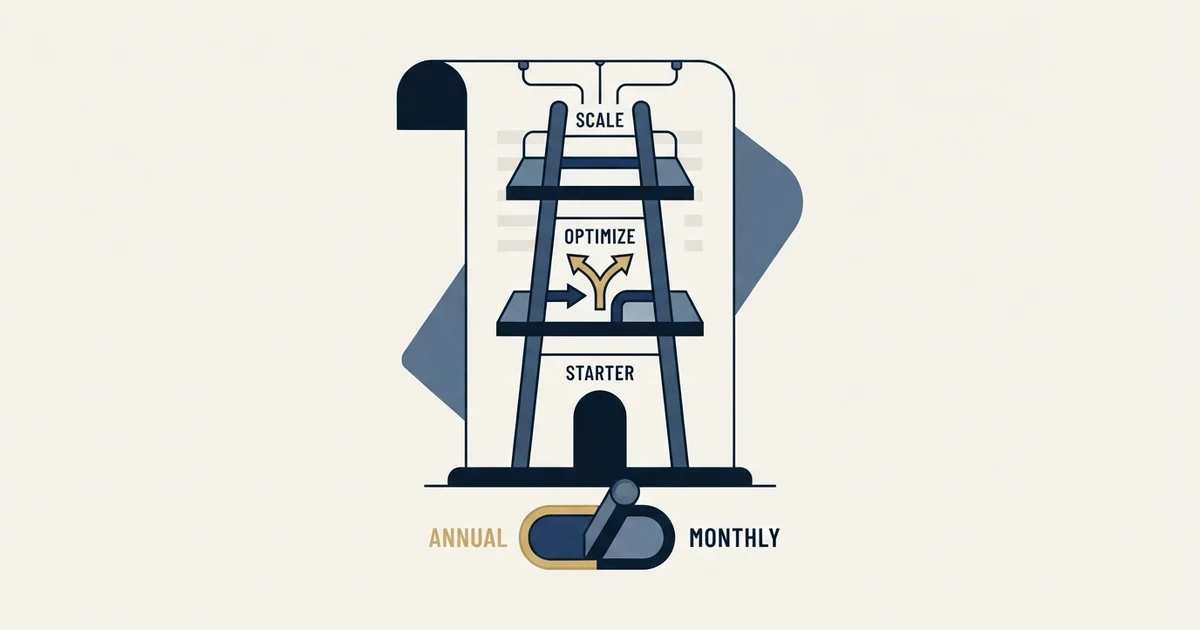
Instapage pricing starts at $79 a month for Create on annual billing, or $99 month to month, with 15,000 unique monthly visitors. Optimize, the first plan with A/B testing, is $159 annual or $199 monthly at 30,000 visitors and $239 or $299 at 50,000. Convert is custom quoted. The plans page displays the annual rate by default.
Key takeaways
- Instapage's plans page shows the annual rate on arrival: $79 for Create and $159 for Optimize, against $99 and $199 month to month.
- Optimize has a second price step the cards do not show until you select it: 50,000 unique monthly visitors at $239 on annual billing or $299 month to month.
- Server side A/B testing starts on Optimize, so a team that intends to test should never price Create, and heatmaps appear only on the custom quoted Convert plan.
- The free trial needs a card and is capped at 2,500 unique monthly visitors, and workspaces rise from 1 to 5 only at the 50,000 visitor option.
Reviewed and updated September 18, 2026
A demand generation manager checking Instapage pricing opens instapage.com/plans, reads $79 a month against the Create plan, and takes that number to a budget conversation. The page is not misleading anyone. Instapage is showing the annual rate by default, and the month to month figure for that same plan is $99.
That gap is small. The one underneath it is not. The experimentation features most teams assume they are buying do not appear on Create at all, and a plan bought for testing has to be Optimize, whose published figures start at $159 and $199 and step up again with traffic.
Here is the ladder on that page, which numbers a visitor sees without touching anything, where the capability boundary falls, and the question about traffic that should be settled before any of it matters.
Instapage pricing: how much does Instapage cost?
Instapage pricing starts at $79 a month for Create on annual billing, or $99 month to month, with 15,000 unique monthly visitors, per its plans page. The same page lists Optimize, the first plan with A/B testing, at $159 annual or $199 monthly at 30,000 visitors, and $239 or $299 at 50,000. Convert, the enterprise plan, is quoted by sales. Both self serve plans carry a 14 day free trial.
The published ladder
Instapage runs three plans, titled on the page itself as "Create, Optimize, Convert". Two of them show rates and the third does not.
| Instapage plan | Rate shown by default | Month to month | Visitor allowance |
|---|---|---|---|
| Create, per the plans page | $79 per month | $99 per month | 15,000 unique monthly visitors |
| Optimize, per the plans page | $159 per month | $199 per month | 30,000 unique monthly visitors |
| Optimize with the 50,000 option selected | $239 per month | $299 per month | 50,000 unique monthly visitors |
| Convert, per the plans page | Custom | Custom | Custom unique monthly visitors |
Above the cards the page carries a billing switch labelled Monthly and Annual with the note "Save up to 20%", and a line stating that all plans include "Unlimited pages", "Unlimited conversions" and "Unlimited contacts". Both self serve tiers offer a 14 day free trial. The Optimize card also offers 50,000 unique monthly visitors and a custom volume. Selecting the 50,000 option moves the figure on the card to $239 on annual billing and $299 month to month, and the page notes that the custom option "will automatically default to 50,000 unique monthly visitors" with sales following up.
All figures above were read from Instapage's plans page.
What Instapage is, before what it costs
Instapage is a landing page platform: a hosted builder for publishing campaign pages without a developer, wrapped in an experimentation and personalization layer aimed at paid acquisition teams. Per its own plans page the platform spans a drag and drop builder, reusable blocks and forms, AI content generation, contacts and email, programmatic page generation, server side A/B testing, and ad to page personalization on the enterprise tier.
The category label around it covers four distinct jobs, and Instapage sits in two of them. It builds pages, and above the entry tier it tests them. It does not source traffic, and outside its enterprise tier it does not observe behaviour on the pages it builds. Knowing which of those jobs you are buying is what makes the rest of the ladder legible, because the tiers are drawn along exactly that line.
Which number a visitor actually sees

The annual and month to month figures are both present in the served document, and the page decides which one to display. In the markup, the annual value carries the active state and the monthly value does not, so a visitor arriving without touching the switch reads $79 against Create and $159 against Optimize. The switch on Instapage's plans page is labelled "Save up to 20%", and that is the discount already applied to the figure on screen rather than one offered against it.
This is worth spelling out because it is the most common way a landing page budget goes wrong, and it is not specific to this vendor. A figure copied from a pricing page, or from a comparison article that copied it earlier, is frequently the annual rate presented without its basis. The commitment attached to Instapage's $79 is a year, and the number for a team that wants to leave after two months is its $99.
The practical form of the check is short. Read the price, then find the billing switch, then confirm which side of it is lit before the figure goes anywhere near a budget line.
Optimize: Recommended
Monthly | Annual Save up to 20% 1
$159 per month 2
30,000 unique monthly visitors (selected), 50,000, or Custom 3
- 1Annual is the lit side on arrival, so the saving is already inside the number below it.
- 2Flip the switch to Monthly and this same card reads $199.
- 3Choose 50,000 visitors and it reads $239 on annual billing, or $299 month to month.
The capability boundary sits between Create and Optimize
Create is a publishing plan. Per the plans page it carries the drag and drop builder, reusable page blocks and forms, real time visual collaboration, triggered popups and sticky bars, AI content, contacts and email, and programmatic pages.
That plan's own feature list on the page includes no way to run an experiment.
Optimize is where the plans page places "Server-side A/B testing", which it describes as a way to "Test multiple variants with no flickering and change traffic split with no page load delay". Alongside it sit hypothesis setting, experimentation history, customizable traffic splitting, scheduling, multi step forms and dynamic text replacement.
So the ladder is not one product at four volumes. Create publishes pages. Optimize tests them. A team that buys Create intending to test later is not buying a smaller version of the same thing, and the upgrade is a move between products rather than a step in a volume ladder.
That shape will look familiar to anyone who has priced this category before. The live comparison of Unbounce records the same boundary on a different vendor's ladder, where A/B testing arrives on Experiment rather than on the cheaper Build tier. Two vendors drawing the capability line in the same place is a fact about how the category is packaged rather than a coincidence.
The meter is unique monthly visitors
Instapage bills on unique monthly visitors and lifts the ceiling with the tier: 15,000 on Create, 30,000 on Optimize with a 50,000 option, and a custom allowance on Convert.
A rival builder runs two meters instead of one, and monthly visits metered separately from AI credits means a plan can run short on either.
Two things follow from that unit. Conversions are explicitly not metered, since the page lists unlimited conversions on every plan, so a page that converts well costs no more than one that converts badly at the same traffic. And the allowances are large. A B2B campaign landing page fed by outbound rather than by paid search is frequently nowhere near 15,000 people a month, which means the entry tier's ceiling is very unlikely to be the binding constraint on the purchase.
What the entry price does not include
The plan cards stop at price and visitors. The rest of the terms sit further down the same page, in the comparison table and the FAQ, and three of them change what the entry price buys.
The trial is smaller than the plan. Instapage's FAQ says a card is required to start one, and that "Your free trial comes with a traffic limit of 2500 unique monthly visitors". Cross that limit and, per the same FAQ, the trial ends automatically and becomes a paid subscription on the plan you selected.
Room for clients arrives at the 50,000 step. The comparison table gives Create and Optimize at 30,000 visitors the same 10 team members, 2 subdomains and 1 workspace. Selecting 50,000 visitors lifts that to 10 subdomains and 5 workspaces. An agency that wants a workspace per client is therefore pricing the $239 step from the start.
Custom volume has conditions. The FAQ states that Instapage does not provide custom usage below the 50,000 level, and that "custom limits are currently available with annual contracts only".
Create
$79
annual rate, 15,000 visitors
- 10 team members
- 2 subdomains
- 1 workspace
Optimize at 30,000
$159
annual rate, adds A/B testing
- 10 team members
- 2 subdomains
- 1 workspace
Optimize at 50,000
$239
annual rate, adds room
- 10 team members
- 10 subdomains
- 5 workspaces
What Convert adds, and one item worth noticing
Convert carries no published rate. The plans page lists it as Custom with a demo request, and describes it as an "enterprise ready platform" with ad to page personalization, global elements, root domain publishing, direct lead bypass so leads reach a CRM without the vendor storing them, and a dedicated customer success manager with professional services.
One entry on that list is worth pulling out. Heatmaps appear on Convert, and only there. A team that wants to watch behaviour on its pages cannot get that from either self serve tier, and the standalone tools that do that job start well below the price of an enterprise contract. What a heatmap can and cannot tell you at low traffic is worked through in Hotjar heatmaps, and the short version is that the constraint is sample size rather than tooling.
Where this fits a page fed by outbound
Most published advice about landing page builders assumes paid traffic, because that is the market the category grew up serving. Dynamic text replacement exists to match a page headline to the ad keyword that produced the click. It has nothing to match when the visitor arrived from a message you wrote and already knows what they were promised.
The experimentation half runs into a harder version of the same problem. A test needs conversions rather than visits, and enough of them to separate a real effect from noise. On a page receiving a few hundred visitors a month the answer arrives late or never. The specific case of running a test on a page that does not have the traffic for one is covered in A/B testing a landing page, and the general trap of reading a rate computed over a few dozen records is in conversion rate.
Before benchmarking your own number against a published figure, it is worth knowing what those figures counted, which average landing page conversion rate sets out.
There is a prior question underneath all of it. A landing page converts demand that already exists and creates none, so when the flow of visitors is thin the page is not the binding constraint and no tier of any builder changes that. Landing page lead generation makes that argument at length, and the wider category map, including which of the four jobs under this label your shortlist is actually shopping for, is in landing page optimization tools.
How to price it

Take the decision in this order.
Name the job in one sentence. If it is publishing pages without waiting on a developer, Create is the tier and the conversation is short. If it is running experiments, the tier is Optimize and Create should not appear in the comparison at all.
Read the rate on the basis you will actually be billed on, not the one the page shows by default.
Then count the visitors reaching the page each month and the conversions they produce. If the conversion count is in single or low double digits, the experimentation tier is buying an instrument that cannot reach a verdict, and the money is better spent on the supply of visitors than on the page they land on.
The short version
Instapage publishes three plans. Create and Optimize carry rates, Convert does not. The figure the page shows without any interaction is the annual one, which is $79 for Create and $159 for Optimize, and the month to month equivalents are $99 and $199. The plans page shows Optimize at 50,000 visitors at $239 and $299. Every plan includes "Unlimited pages", "Unlimited conversions" and "Unlimited contacts", and the meter is "unique monthly visitors" at 15,000, 30,000 with a 50,000 option, and a custom allowance.
The line that decides the purchase is not the price and not the visitor ceiling. Server side A/B testing starts on Optimize, so a team that intends to test should never price Create, and heatmaps sit further up again on the custom enterprise tier. When the shortage is the flow of qualified visitors rather than the page receiving them, see what a first campaign produces against your own market.
Pricing and features are taken from the vendors' own pages. Verify current terms with the vendor before relying on them.
Frequently asked questions.
Frequently asked questions- How much does Instapage cost per month?
- Instapage's plans page lists Create at $79 a month on annual billing or $99 month to month, with 15,000 unique monthly visitors. Optimize is $159 annual or $199 monthly at 30,000 visitors, and $239 or $299 at 50,000. Convert, the enterprise plan, shows Custom with a demo request. The page displays the annual figures by default.
- Which Instapage plan includes A/B testing?
- Optimize. Instapage's plans page places server side A/B testing, hypothesis setting, experimentation history, customizable traffic splitting and dynamic text replacement on Optimize, and the Create plan's own feature list includes no way to run an experiment. A team that intends to test should price Optimize from the start and leave Create out of the comparison.
- Does Instapage have a free trial?
- Yes, on Create and Optimize, for 14 days. Instapage's FAQ says a credit card is required to start and that the trial carries a traffic limit of 2,500 unique monthly visitors. If a trial page passes that limit, the trial ends automatically and converts to a paid subscription on the plan that was selected.
- Is Instapage pricing based on visitors or conversions?
- Visitors. Instapage meters unique monthly visitors: 15,000 on Create, 30,000 or 50,000 on Optimize, and a custom allowance on Convert. The plans page lists unlimited conversions, unlimited pages and unlimited contacts on every plan, so a page that converts well costs no more than one that converts badly at the same traffic.
About the author.

B2B cold email experts helping companies generate qualified leads through done-for-you outreach campaigns.
RevenueFlow Team
Explore more.
Ready to scale your outreach?
We build GTM engines that book real meetings. See the receipts.
Related articles.
Appointment Setting for Business Brokers: The Seller Meeting
What a bought meeting with a business owner has to be for a brokerage: the three-part qualification, the confidentiality rules, the licence line and the owner's reasons.
LinkedIn Outreach for Utilities: Selling to the Sector
How a vendor selling to utilities uses LinkedIn next to a published sourcing process: the three ownership models, the registration gate and what a message may ask.
Cold Calling for Telecom Companies: A Carrier's Own Rules
What only a telecom company meets on the phone: the FTC exemption that stops at its contractor, the verified carrier change, and the CPNI limit on lists.
Lead Generation for EHR Vendors: A Replacement Market
Adoption is close to complete, so every deal is a switch. Where the incumbent field is published, which rules shape the pitch and who actually signs.
SDR Outsourcing for Agriculture Companies
Whether an outside sales development team can work for a company selling into agriculture: who already covers the account, which weeks exist, and the show rule.
LinkedIn Outreach for Banks: A Regulated Message
How a bank's relationship managers use LinkedIn to reach business owners: what the FFIEC guidance, FINRA's notices and LinkedIn's own rules require, and where to stop.