Cold Email Platforms Compared: Sending, Warmup, Rotation
Inbox rotation, per-mailbox limits, sending windows and bounce handling are where these products actually differ. What each mechanism does and how bad ones fail.
Pre-warmed mailboxes are sending accounts a vendor has warmed before you buy them. Instantly sells pre-warmed Google accounts in batches of 5 and keeps domain ownership; Smartlead sells pre-warmed Google and Outlook mailboxes at $9 a month. Beyond that, cold email platforms differ in rotation, limits, warmup, sending windows and suppression.
Key takeaways
- Instantly's help centre says its pre-warmed accounts are Google only, sold in batches of 5, and that Instantly keeps domain ownership and administrator access.
- Even pre-warmed, Instantly advises starting at 5 emails a day per account and capping at 20 to 25, below the 30 it recommends for ordinary accounts.
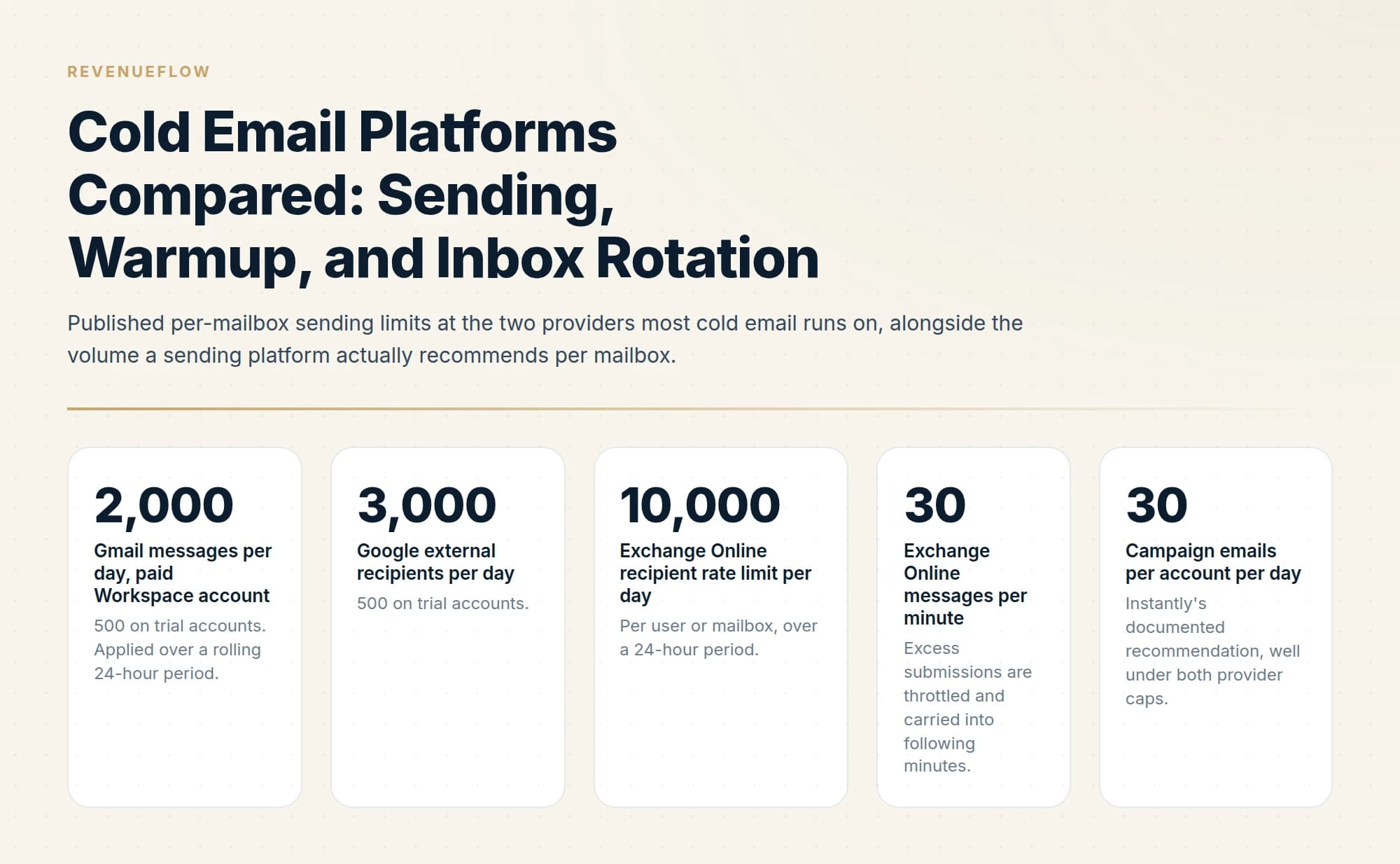
- Google allows 2,000 messages a day per paid Workspace mailbox over a rolling 24 hours, and Exchange Online allows 10,000 recipients a day at 30 messages a minute.
- Suppression scope matters most: a bounce or unsubscribe that applies to one campaign leaves the address live in every other campaign in the workspace.
Reviewed and updated September 21, 2026
Google Workspace permits a single paid mailbox to send 2,000 messages a day. Instantly's own help centre recommends 30 campaign emails per account per day. That gap, roughly sixty-six to one, is the reason cold email platforms exist as a product category at all, and the reason several of them now sell pre-warmed mailboxes beside the software.
A cold email platform is an arithmetic engine sitting between a list and a pool of mailboxes, deciding which mailbox sends which message at which minute, under limits far tighter than anything the mail provider imposes. Almost every real difference between these products lives in that arithmetic. Feature lists rarely describe it, so this piece walks through the five mechanics that actually vary: inbox rotation, warmup, per-mailbox limits, sending windows, and how replies and bounces come back.
The ceiling that matters is not the provider's
Start with the hard walls, because they are published and they bound everything above them.
Google applies its daily limits over a rolling 24-hour window rather than resetting at a set time of day, and an account that trips a limit cannot send for up to 24 hours. Microsoft publishes a per-mailbox recipient rate limit of 10,000 a day, a per-message recipient limit customisable up to 1,000, and a message rate limit of 30 a minute, with excess submissions throttled and carried over. Microsoft also runs a tenant-level cap, the Tenant External Recipient Rate Limit, which varies with licence count and is fixed at 5,000 external recipients a day for trial tenants. The same documentation states plainly that Exchange Online is not suited to bulk-mailing scenarios.
None of those numbers is the number a cold email programme runs at. The binding constraint is reputation, which lives one or two orders of magnitude below the provider's cap, and it is the constraint a platform is built to manage.
Inbox rotation, and what a bad rotation costs

Inbox rotation means the platform holds a pool of connected mailboxes and picks one for each outgoing message, instead of sending everything from a single account. It exists because volume in cold email comes from mailbox count rather than from per-mailbox throughput. Instantly documents the arithmetic directly: multiply your account count by 30 to get a recommended campaign limit.
Strategies differ in ways worth asking about before you buy. Even round-robin spreads sends across the pool uniformly. Sequential draining fills one mailbox to its cap before moving to the next, which concentrates all of the early risk on one account and one domain. Health-weighted rotation sends more through mailboxes with better recent signals and quarantines the rest. Ramped rotation raises a new mailbox's share gradually rather than dropping it straight into the pool at full share, which is what Instantly's slow ramp does when it lifts an account's daily limit by two emails a day until it reaches the maximum.
Three failure modes are worth naming, because they are quiet.
Rotation across mailboxes is not rotation across domains. Ten mailboxes spread over two domains gives you ten sending identities and two reputations. Receivers evaluate the domain. A pool that looks broad in the platform's interface can be narrow where it counts, and the fix is more domains rather than more mailboxes per domain.
Bursty distribution collides with rate limits. A platform that releases a batch at the top of the window rather than spacing sends across it can push a mailbox past a provider's per-minute ceiling. Microsoft throttles and carries the excess forward, so the symptom is a campaign that quietly finishes late rather than an error you would notice.
The pool shrinks and something has to give. When mailboxes are paused, disconnected or held back by health checks, either the campaign sends less that day or the remaining mailboxes absorb the shortfall. Those are opposite behaviours, and which one you get is determined by whether the platform enforces a per-account limit, a per-campaign limit, or both. Instantly's documentation defines both explicitly: the account limit governs total campaign emails from one account across all campaigns, and the campaign limit governs total emails in one campaign across all accounts. Two numbers, and you need both, because setting only the campaign limit lets shared mailboxes exceed what you intended once they appear in three campaigns at once.
Warmup: bundled, or a separate product
Warmup means automated conversational traffic between mailboxes, sent to build a sending history before real campaigns start and, usually, kept running alongside them. Platforms split into two camps. Instantly and Smartlead bundle warmup into their sending plans. MailReach and Warmy sell it as a standalone product that connects to mailboxes you send from elsewhere.
Which camp a vendor sits in tells you less than three questions about the implementation do.
Does warmup traffic share a budget with campaign traffic? Both consume the same provider quota and the same mailbox reputation. A platform that reports them separately and caps them separately is easier to reason about than one that shows a single number.
Does warmup keep running once campaigns start? MailReach's guidance is that the initial warmup phase should last a minimum of 14 days with no campaigns sent during it, and that warming should continue alongside campaigns afterwards. That is a vendor position rather than a law of nature, but it is a clear one, and it is a useful thing to check your own configuration against.
Does the tool measure placement, or only generate traffic? These are genuinely different measurements. A count of warmup emails sent tells you traffic happened. Spam testing against a seed list tells you where mail landed. MailReach publishes both warmup and spam testing on a per-mailbox rate that its page showed in euros when read for this guide, €25 a month falling to €19.5 from six mailboxes, with at least 20 spam test credits, a ceiling of up to 100 emails a day, and health checks covering blacklists, SPF, DKIM, DMARC and ETS. Warmy's pricing page, rendered in full, shows no price in any currency, selling volume-based B2B, B2C and custom plans with Google Postmaster data, deliverability monitoring, a dedicated expert and a 7-day trial with no credit card.
If your platform bundles warmup and reports only volume, you have the traffic half and not the measurement half. The measurement half is available free for Gmail through Google Postmaster Tools, and the sequencing of warmup against a new domain's first real send is covered in warming up a domain for cold email. The standalone products are compared in email warmup services.
Pre-warmed mailboxes: what vendors actually sell
Pre-warmed mailboxes are sending accounts a vendor has already run through warmup before you buy them, so a campaign can start without the usual weeks of ramp. Instantly's help centre describes its pre-warmed accounts as already warmed up and pre-configured with SPF, DKIM and DMARC, and Smartlead's SmartSenders lists pre-warmed Google and Outlook mailboxes supplied through Zapmail.
Instantly pre-warmed accounts
- Warmup already complete; DNS set with SPF, DKIM and DMARC
- Google accounts only, sold in batches of 5
- Ownership Instantly keeps the domain and admin access
- Start at 5 a day per account, capped at 20-25 a day
- Renewal: $15 a domain a year, $10 an account a month
Smartlead SmartSenders
- Pre-warmed Google and Outlook mailboxes, powered by Zapmail
- $18 a domain a year, $9 a mailbox a month
- Fresh mailboxes beside them, from $3.99 a mailbox a month
The terms matter more than the label. Instantly's pre-warmed accounts are Google only, sold in batches of 5, and exclusively configured for use inside Instantly; its help centre says it retains domain ownership and administrator access and cannot transfer them. Its own guidance is to raise sending gradually even so, starting at 5 emails a day per account and capping at 20 to 25, which sits below the 30 it recommends for ordinary accounts. Renewals run $15 a domain a year and $10 an account a month. Smartlead lists its pre-warmed Google and Outlook mailboxes at $18 a domain a year and $9 a mailbox a month, beside fresh mailboxes from $3.99 a month.
Three kinds of provider cover this ground between them: sending platforms that bundle rotation and warmup, such as Instantly and Smartlead; standalone warmup and deliverability tools, such as MailReach and Warmy; and sellers of domains and mailboxes, fresh or pre-warmed, a business both platforms now also run inside their own apps. How the pieces stack is set out in cold email infrastructure. Before buying pre-warmed, ask two questions: who owns the domain when you leave, and how much the vendor says it may send in its first weeks.
Sending windows, and whose clock they run on

Every platform offers a sending window. The differences are in whose timezone it uses and what happens when the window is too small for the queue.
Windows anchor to one of three clocks. The mailbox's configured timezone is the simplest and is what most defaults use. The campaign's timezone is a single setting applied to everyone, which is fine for one country and wrong for a list spanning several. The recipient's timezone is the one buyers ask for, and it depends entirely on the platform inferring a timezone from country, state or city on the lead record, so its accuracy is your data's accuracy rather than the platform's.
Two behaviours are worth testing before you commit a list to a platform. The first is overflow: when a day's volume does not fit the window, does the remainder roll into tomorrow, or is it dropped and re-queued from the top? Rolling overflow compounds, so a window persistently too narrow produces a backlog that shows up weeks later as a campaign that never finishes. The second is the interaction with rolling provider limits. Google's daily limits run over a rolling 24 hours rather than resetting at midnight, so a platform that models the day as a calendar day can schedule a full allocation for a mailbox that is still carrying yesterday's late sends.
Bounces and replies coming back
Outbound gets the attention, and the inbound path is where platforms differ most in ways you feel later.
Reply detection is either an IMAP poll or a provider API subscription, and the difference is latency. A poll on a long interval can leave a reply unseen for an hour or more. Ask what the interval is, and ask whether the platform detects a reply that arrives at a different address than the one that sent, which happens whenever a signature carries a preferred contact address.
Bounce handling has three parts to check. Whether the platform separates hard bounces from soft ones rather than counting both. Whether a bounce is attributed to the mailbox that sent it, so a single failing domain in the pool is visible rather than averaged into a workspace-wide rate. And the scope of automatic suppression, which is the important one. A bounce or an unsubscribe that suppresses the address in one campaign leaves it live in every other campaign in the workspace, so the same person is contacted again from a different mailbox by a colleague running a different list. Workspace-wide suppression is the behaviour to look for, and it is what we run: a negative reply unsubscribes that person across every campaign in the workspace, not just the one they answered.
That matters more to us than stop-on-reply logic does, because we send one message per campaign and never follow up. The reasoning behind that is in email sequence software. The non-sending side of an evaluation, covering pricing units, API quality and how to structure a trial, is in cold email software, and the rest of the stack around the platform is in the cold email tool stack.
| Check | What to look for |
|---|---|
| Rotation | Spreads sends across domains, not only mailboxes |
| Limits | A per-account daily limit beside the per-campaign one |
| New mailboxes | Ramp into the pool instead of joining at full share |
| Warmup | Reported and capped apart from campaign volume |
| Suppression | Bounces and unsubscribes apply workspace-wide |
| Bounces | Traced to the sending domain |
| Daily limit clock | Red flag: a calendar day where the provider uses a rolling 24 hours |
| Sending window | Recipient timezone, only as good as your lead data |
The short version

Provider caps bound the problem and never define it. Google allows 2,000 messages a day per paid mailbox over a rolling 24-hour window, Microsoft allows 10,000 recipients a day at 30 messages a minute per mailbox, and a sending platform will recommend a fraction of either, with Instantly documenting 30 campaign emails per account per day. Volume therefore comes from mailbox count, which is what inbox rotation manages.
Compare platforms on five mechanics. How rotation distributes sends, and whether it distributes across domains rather than only across mailboxes. Whether warmup is bundled or standalone, whether it continues during campaigns, and whether it measures placement or only counts traffic. Whether per-mailbox and per-campaign limits both exist, since only having the second lets shared mailboxes exceed your intent. Which clock the sending window runs on and what happens to overflow. And how far a bounce or an unsubscribe propagates, because campaign-scoped suppression means the same person hears from you again from a different mailbox.
We run sending infrastructure, rotation and suppression as part of our outbound engagements, which tends to be the layer clients are least interested in owning. You can see what a campaign would look like for your market.
Pricing and features are taken from the vendors' own pages. Verify current terms with the vendor before relying on them.
Sources: Gmail sending limits in Google Workspace, Exchange Online limits, Microsoft Learn, Account and campaign limits, Instantly help centre, MailReach pricing, How email warmup works, MailReach, Warmy pricing, Pre-warmed domains and accounts, Instantly help centre, Smartlead pricing
Frequently asked questions.
Frequently asked questions- What are pre-warmed mailboxes?
- They are sending accounts a vendor has already run through warmup before you buy them, so campaigns can start without weeks of ramp. Instantly describes its pre-warmed accounts as already warmed and pre-configured with SPF, DKIM and DMARC. Smartlead lists pre-warmed Google and Outlook mailboxes, supplied through Zapmail, at $18 a domain a year and $9 a mailbox a month.
- Can I send full volume from a pre-warmed mailbox on day one?
- Not on Instantly's own guidance. Its help centre says that even though the accounts are pre-warmed, sending limits should rise gradually, starting at 5 emails a day per account and capped at 20 to 25 a day. That cap sits below the 30 campaign emails a day it recommends for ordinary connected accounts.
- What is inbox rotation in cold email?
- Inbox rotation means the platform holds a pool of connected mailboxes and picks one for each outgoing message, instead of sending everything from one account. Volume comes from mailbox count rather than per-mailbox throughput. Instantly documents the arithmetic as the number of accounts multiplied by 30 to get a recommended daily campaign limit.
- Which kinds of provider handle cold email infrastructure?
- Three kinds. Sending platforms such as Instantly and Smartlead bundle rotation and warmup with the sequencer. Standalone tools such as MailReach and Warmy sell warmup and deliverability testing for mailboxes you send from elsewhere. And sellers of domains and mailboxes, fresh or pre-warmed, a business both of those platforms now also run inside their own apps.
About the author.

Tim Carden is CMO / CTO at RevenueFlow, which builds and operates outbound revenue engines for B2B companies. Studied at McGill University.
Tim Carden · CMO / CTO
Connect on LinkedIn →Explore more.
Ready to scale your outreach?
We build GTM engines that book real meetings. See the receipts.
Related articles.
Graymail vs Spam: What the Difference Costs a Sender
Graymail is a claim about a sending pattern. Spam is a claim about intent. They respond to different repairs, and confusing them sends teams to rewrite copy.
Email Address Capitalization: What It Changes for Senders
Capitalization in an email address does not decide delivery. It decides whether two rows are one person, and that is where a suppression list quietly fails.
Kickbox Pricing: The Ladder and the Opt-In Rule
Kickbox publishes a complete thirteen-step verification ladder, and an anti-spam policy that rules out purchased and harvested lists entirely.
The ZeroBounce API: Auth, Rate Limits and What to Store
ZeroBounce publishes three different answers to its own rate-limit question. Here is which one to build against, plus the statuses no API can decide for you.
ZeroBounce Pricing: The Three Things Buyers Miss
What the ZeroBounce pricing page actually publishes, which billing state it shows by default, and the credit rules that decide what a buyer really pays.
Why Your DMARC Is Failing: The Six Causes
Six causes of DMARC failure, ordered by how often they occur, with the symptom in reports and the fix for each. Alignment accounts for most of them.